
Plugins · Wootomic
Keep WooCommerce fast during product sync
When a catalogue update touches thousands of products, most stores rebuild cached pages and the live shop crawls. Wootomic updates price, stock, SKU, and image on the page already served — so shoppers keep a fast store while the sync runs.
Ready to keep your shop fast during sync?
Case study
How we solved catalogue sync for MatzoTech

matzotech.co.za · South African computer retailer · WooCommerce
Strand Web was doing site updates for MatzoTech when their product sync ran. Price and stock had to change across a large catalogue — about 10,000 products. The importer and ERP still did that work. The damage was on the storefront: each save knocked cached catalogue pages over, the server rebuilt HTML, and the live shop felt slow for anyone shopping while the sync was still going.
We did not replace Smart IT or speed up the importer. We built Wootomic so finished WooCommerce writes could land as small price, stock, SKU, and image updates on pages that stayed cached. Shoppers still see live numbers. The catalogue HTML stays warm unless the change is structural and a normal refresh is required.
What we changed
- Leave the sync alone. MatzoTech’s ERP still writes completed products into WooCommerce on its usual cadence.
- Classify each save. Wootomic watches the finished write and decides whether only shopper-facing fields moved, or the page itself must rebuild.
- Keep warm HTML. Eligible updates go to the object cache (typically Redis) as a public snapshot. Cached product and archive pages are not thrown away.
- Hydrate in the browser. The already-served page updates price, stock, SKU, and image in place. Unsafe changes still take the full refresh path.
Controlled lab on that catalogue
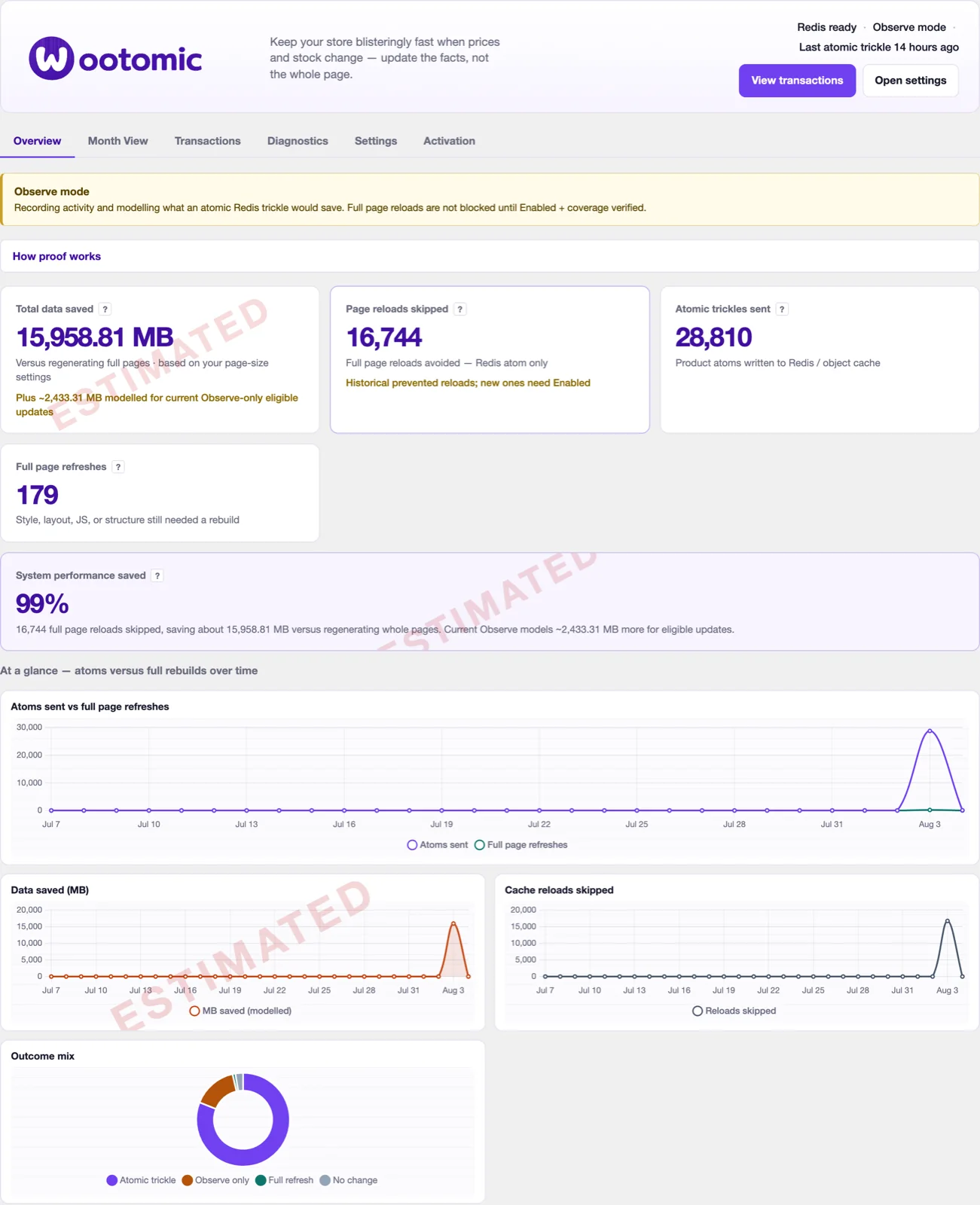
We then ran a measured A/B on a production-synced copy of the MatzoTech stack — 5,000 price and stock updates, Observe versus Enabled. These figures are catalogue work avoided, not visitor page views. Data saved is estimated.
Lab on a production-synced local stack, not a hosting SLA. Structural product changes still purge and rebuild as they should.
What changes for shoppers
Without Wootomic
A large catalogue sync updates the database, then the cache layer throws away catalogue HTML. Shoppers wait on full page rebuilds while stock and prices land.
With Wootomic
Cached pages stay warm. Tiny price, stock, SKU, and image updates hydrate in the browser. A full refresh still happens when the page cannot be patched safely.
How Wootomic updates a WooCommerce catalogue
Wootomic is a proprietary Strand Web WordPress plugin for WooCommerce. It uses the WordPress object cache (typically Redis) and a small browser script. Stores should stay in Observe mode until staging checks pass.
WooCommerce finishes the write
Your existing sync still updates products. Wootomic consumes completed output; it never invents stock, prices, or checkout state.
A public snapshot is stored
Supported fields are stored as a product snapshot through the object cache, ready for a bounded REST read.
The page hydrates in place
Shoppers keep the cached HTML. Price, stock, SKU, and image update on the page instead of forcing a catalogue rebuild.
Unsafe changes still refresh
Structural or uncertain updates take the normal full-page path. The shop is never left with a half-patched product.
Get your activation code
Install in WordPress, then subscribe here
Wootomic updates price, stock, SKU, and image on cached WooCommerce pages so a large catalogue sync does not rebuild the shop. Install in WordPress, then subscribe here for your activation code.
- Install in WP admin. Download Wootomic and activate the plugin on your WordPress site.
- You need an activation code. The plugin sends you here to subscribe.
- Register and pay by card. Quick register, then a secure card subscription — the same flow as Virtual Office.
- We activate it. When payment is confirmed, your code is approved and Wootomic unlocks in WordPress admin.
Frequently Asked Questions
Why does WooCommerce slow down during a product sync?
Each product save can invalidate cached catalogue pages. When a feed or importer updates thousands of products, the shop rebuilds HTML instead of serving warm pages — so shoppers hit a slow store while the sync is still running.
Does Wootomic make the importer itself faster?
No. Wootomic does not replace WP All Import, CSV tools, or your ERP feed. It keeps the live shop usable while those tools write price, stock, SKU, and image changes — by updating those fields on pages that are already cached, instead of rebuilding every page.
Who was Wootomic built for?
Strand Web built it while updating MatzoTech, a South African WooCommerce retailer whose catalogue sync made the live shop slow. A controlled lab on a production-synced copy of that catalogue is on this page. The plugin is for any WooCommerce store with the same pattern.
Is Wootomic website analytics or page-view tracking?
No. It reports catalogue work avoided — page rebuilds skipped and estimated data saved — not visitor traffic. Saved-byte figures are estimates.
Which products does it support today?
The current release hydrates simple WooCommerce products. Structural changes, unsupported fields, and anything the page cannot patch safely still use a normal refresh. Start in Observe mode until your staging checks pass.
How do I activate Wootomic?
Download and install Wootomic in WordPress admin, then subscribe on this page. When payment is confirmed we issue your activation code and the plugin unlocks on your site.
Where do I get the activation code?
After you subscribe, the code is stored on your Strand Web account. Once payment is approved it becomes active — enter it in the plugin settings in WordPress admin.
How do I pay?
Subscribe with a card on this page (the same quick-register flow as Virtual Office). If you already have an active Strand Web debit or card mandate, we add Wootomic to your account instead.
Can I use Wootomic on more than one site?
Yes. Tell us how many WordPress sites you need it on when you subscribe, or contact us after signup.
WooCommerce product sync performance plugin by Strand Web
Wootomic is a WordPress plugin from Strand Web for WooCommerce stores that stay slow during product sync. It was built while updating MatzoTech, after a live shop struggled while about 10,000 products updated. Install it in WordPress admin, subscribe on this page for an activation code, and once payment is confirmed the plugin unlocks on your site.
Strand Web builds and hosts business websites in the Strand, Helderberg, and across South Africa. Wootomic is sold only from this site — not from WordPress.org. If you also need hosting or a managed WooCommerce build, start from our website hosting packages.
Ready to keep the shop fast during sync?
Subscribe with your card and we issue your activation code.